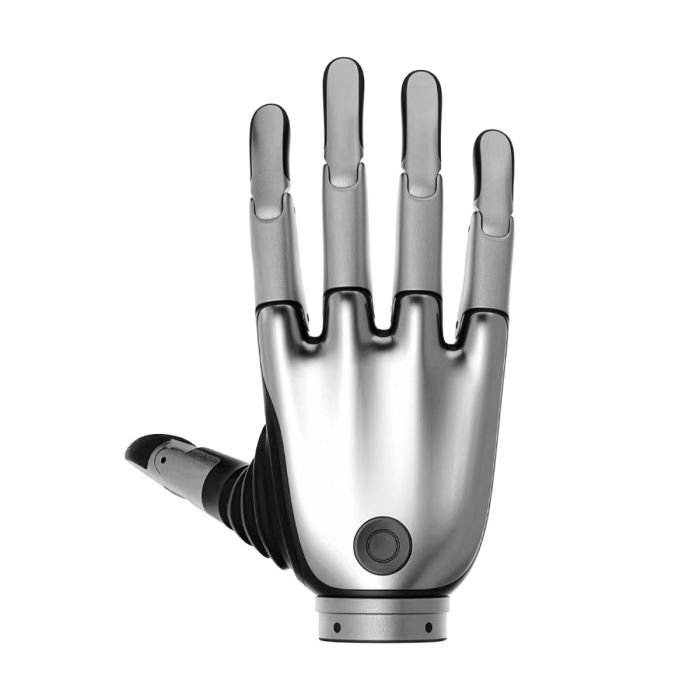
Brainco Revo 2 Touch Biomimetic Dexterous Right Hand (XTR)
In stock
- BRAND:
- BRAINCO
- MODEL:
- REVO 2 TOUCH
- PART #:
- XTR
- ORIGIN:
- China
- AVAILABILITY:
- SUBJECT TO AVAILABILITY
- SKU:
- BrainCo-Revo-2-Touch
Brainco Revo 2 Touch Biomimetic Dexterous Right Hand (XTR)
A robot can place its fingers exactly where the camera says an object is and still not know whether it is holding that object. Contact is the moment at which vision stops helping, and the hand has to report for itself. The Brainco Revo 2 Touch Biomimetic Dexterous Right Hand (XTR) is the version of the Revo 2 family that carries a multi-dimensional fingertip tactile module, so that the fingers themselves become a source of information for the controller.
The product is available through this page, by quotation.
Background
The company and its lineage
BrainCo was founded in 2015 and was incubated by the Harvard Innovation Lab (i-Lab); the company is based in Somerville, Massachusetts. Its Revo line is the company's work on bionic hands, and the second generation is a bionic dexterous hand for robot integration and research.
The Revo 2 family is offered in three versions, each with a left-hand and a right-hand code: Basic (XRL/XRR), Pro (XEL/XER) and Touch (XTL/XTR). The code of this product, XTR, identifies the Touch version for the right hand. Buyers who need the mirror-image hand will find the Brainco Revo 2 Touch Biomimetic Dexterous Left Hand (XTL) on its own page, and the earlier generation is listed separately as the BrainCo Revo 1 Intelligent Dexterous Bionic Hand.
Positioning and key technology
Within the family, the Touch version is the one for work in which contact itself is the subject. Its distinguishing feature is the multi-dimensional fingertip tactile module. The same hand offers three communication interfaces, RS-485, CAN FD and EtherCAT, located below the wrist, together with an SDK that supports Python and C and is compatible with Linux, Windows and ROS systems.
Protective functions are part of the design: current protection, stall protection, high-temperature protection and anti-collision protection. For a hand that will be driven repeatedly by experimental code, these are the features that decide whether a research programme loses days to hardware faults or not.
Technical Specifications
| Specification | Value |
|---|---|
| Version code | XTR (Touch, right hand) |
| Pinch force | ≥15N |
| Control precision | 0.1° |
| Tactile module | Multi-dimensional fingertip tactile module |
| Communication interfaces | RS-485, CAN FD, EtherCAT |
| Interface location | Below the wrist |
| SDK | Python/C; Linux, Windows and ROS |
| Protections | Current, stall, high temperature, collision |
| Default device ID (right hand) | 127 |
| Standard colours | Space Gray, Silver (bulk colour customisation supported) |
Specifications as published by the manufacturer; confirmed against the datasheet at quotation.
The manufacturer has not published the package contents, the ingress protection rating, the tactile sensor resolution or the cable length; they are confirmed at quotation.
What does the Touch version add to the Revo 2 family?
The answer is the fingertip tactile module. In the version table, the Basic version (XRL/XRR) is shown without a tactile module, while the Touch version (XTL/XTR) is listed with a multi-dimensional fingertip tactile module. A hand without tactile feedback can still close on an object, but the controller must infer the result from position and current. A hand with fingertip sensing gives the research team a direct channel for what the fingers experience.
The communication options are also relevant. The advanced and tactile versions support all three interfaces, RS-485, CAN FD and EtherCAT. For a team choosing between a simple serial link on a bench and an industrial fieldbus on a humanoid platform, this means the same hand can be taken from one setting to the other without changing the product.
If tactile sensing is not part of the experiment, the BrainCo Revo 2 Basic Right Dexterous Bionic Hand (XRR) and the BrainCo Revo 2 Pro Dexterous Right Hand (XER) are the siblings to compare.
How is the hand integrated into a robot or a test bench?
Integration begins with the interface below the wrist, where the three communication options are available. Each right-hand unit carries a default device ID of 127, and the left hand uses 126, which matters for a bimanual platform where two hands share one bus and must be addressed separately.
On the software side, the SDK supports Python and C and is compatible with Linux, Windows and ROS systems. Teams that already run ROS can therefore bring the hand into an existing stack, and teams that write their own controller in C have a route as well. The control precision of 0.1° and the pinch force of ≥15N are the figures a motion planner and a grasp planner will need first.
Because current, stall, high-temperature and anti-collision protection are built in, an unattended test run is less likely to end in a damaged finger. The standard colours, Space Gray and Silver, can be customised in bulk for programmes that need a particular appearance.
Who is the Brainco Revo 2 Touch Biomimetic Dexterous Right Hand (XTR) for?
The first segment is the manipulation research laboratory. Groups studying slip, pressure and contact need a hand whose fingertips report what happens at the object, and the Touch version is the member of the family that provides this. Such teams often work within the wider field of Research Robots, and the hand fits that kind of programme.
The second segment is the humanoid developer. A humanoid platform needs a right hand that connects through an industrial bus and can be addressed by its device ID, and the EtherCAT and CAN FD options serve this requirement. The browse page for Hands shows the alternatives for those who are still comparing.
The third segment is the integrator who must deliver a working demonstration to a customer. The SDK, the protections and the colour options reduce the amount of custom work around the hand. Buyers who do not need tactile sensing, or who need a left hand, should look at the Basic and Pro versions or at the XTL page linked above.
What is the Brainco Revo 2 Touch Biomimetic Dexterous Right Hand (XTR) used for?
- Tactile manipulation research. Studying how fingertip contact information changes the way a grasp is planned and corrected.
- Humanoid robot hands. Giving a humanoid platform a right hand that can be controlled over RS-485, CAN FD or EtherCAT.
- Grasp repeatability trials. Running the same grasp many times with 0.1° control precision to compare outcomes.
- Software development. Writing and testing control code with the Python and C SDK under Linux, Windows or ROS.
- Teaching and laboratory demonstration. Showing students how contact sensing, protections and bus communication work in a real hand.
- Bimanual experiments. Pairing the right hand (ID 127) with a left hand (ID 126) for two-handed tasks.
Pricing and Availability
No price is printed on this page. A quotation is the way to proceed: send the quantity, the intended platform and the communication interface you plan to use, and the quotation will state the commercial terms. Delivery, customs and support are arranged with the quotation. The Brainco Revo 2 Touch Biomimetic Dexterous Right Hand (XTR) is available on this page.
Frequently Asked Questions
Which version of the Revo 2 carries the tactile module?
The Touch version, with the codes XTL and XTR, carries the multi-dimensional fingertip tactile module. XTR is the right hand.
Which communication interfaces does it support?
It supports RS-485, CAN FD and EtherCAT. The interface is located below the wrist.
Which software environments does the SDK support?
The SDK supports Python and C and is compatible with Linux, Windows and ROS systems.
What protections does the hand have?
It has current protection, stall protection, high-temperature protection and anti-collision protection.
What is the default device ID of the right hand?
The default device ID of the right hand is 127. The left hand uses 126.
Is the ingress protection rating or the tactile sensor resolution given?
Neither is stated on this page. Ask for them with your quotation, together with the package contents and the cable length.
Where can I buy the Brainco Revo 2 Touch Biomimetic Dexterous Right Hand (XTR) and what does it cost?
It is available through this page, by quotation. The cost is stated in the quotation, which also covers delivery, customs and support.
Summary
A hand that closes without feeling is only half of a solution. The Brainco Revo 2 Touch Biomimetic Dexterous Right Hand (XTR) adds the fingertip tactile module to the Revo 2 platform, together with a pinch force of ≥15N, a control precision of 0.1°, three communication interfaces, an SDK for Python and C, and four protective functions. For teams whose work depends on what happens at the moment of contact, this page is the starting point.
Specifications
General
Physical
Mobility
Performance
Connectivity
Software
Hand
Shipping
What's included
Videos